Buying a tablet for school should not mean emptying your bank account. The good news for students in 2026 is that budget tablets have reached a level of quality that would have been unthinkable five years ago. Processors are faster, displays are sharper, and battery life stretches well past a full day of lectures and study sessions. The challenge is sorting through dozens of options to find the one that fits your needs and your budget.
Key Takeaways
- What to Look for in a Student Tablet
- 1. Apple iPad 10th Generation
- 2. Samsung Galaxy Tab A9+
- 3. Amazon Fire Max 11
This guide breaks down the best budget tablets for students, with honest assessments of what each device does well and where it falls short. Every tablet on this list costs under $400 and can handle note-taking, research, video lectures, and light multitasking without frustration.
What to Look for in a Student Tablet
Before diving into specific models, it helps to know what actually matters for academic use. Marketing specs can be misleading. A tablet with a blazing-fast processor means nothing if the battery dies halfway through your afternoon classes.
Key Features for Students
- Display quality — You will spend hours reading on this screen. Look for at least 1920x1200 resolution and good viewing angles. An anti-glare coating is a bonus for outdoor study sessions.
- Battery life — Aim for 10 hours or more of real-world use. Manufacturer claims are usually optimistic, so check independent reviews for actual numbers.
- Stylus support — If you take handwritten notes, stylus compatibility is essential. Some tablets include a stylus; others require a separate purchase.
- Keyboard options — A detachable keyboard turns a tablet into a laptop replacement. Check whether the manufacturer offers a first-party keyboard case.
- Storage — 64GB fills up fast with textbooks, lecture recordings, and apps. Look for 128GB or expandable storage via microSD.
- App ecosystem — Make sure the tablet runs the apps you need. Check compatibility with your school''s LMS, note-taking apps like Goodnotes or Notability, and any discipline-specific software.
1. Apple iPad 10th Generation
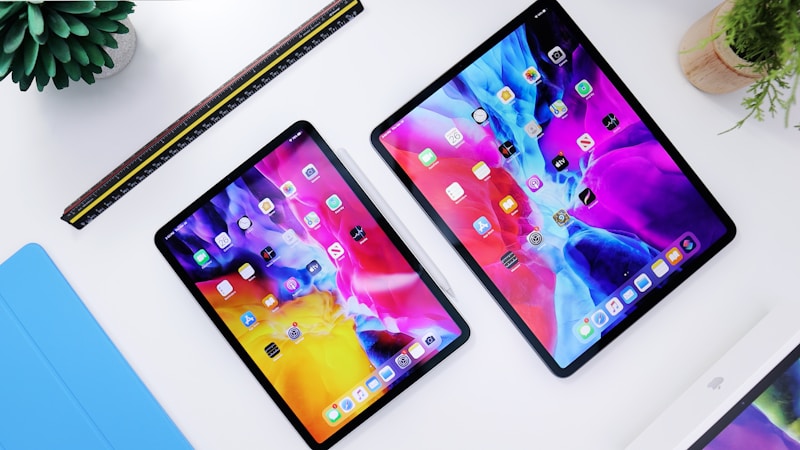
The iPad 10th generation remains the gold standard for student tablets. Apple has kept this model in its lineup specifically because it hits the sweet spot of price, performance, and ecosystem support. The A14 Bionic chip handles everything from split-screen multitasking to light photo editing without hesitation.

Pros
- Exceptional app ecosystem with optimized educational apps
- Smooth performance for note-taking, browsing, and video calls
- 10.9-inch Liquid Retina display with excellent color accuracy
- Strong resale value when you upgrade
- Long software support — expect 5+ years of iPadOS updates
Cons
- Apple Pencil and keyboard case sold separately, adding $150-250 to total cost
- 64GB base storage is limiting for heavy users
- No expandable storage via microSD
Price: Starting at $349
Best for: Students who want the most polished tablet experience and are willing to invest in accessories.
2. Samsung Galaxy Tab A9+
Samsung''s Galaxy Tab A9+ is the best Android option for students on a tight budget. The 11-inch TFT display is bright enough for indoor use, and the Snapdragon 695 processor keeps things moving smoothly for everyday tasks. What sets it apart is the inclusion of Samsung''s DeX mode, which transforms the interface into a desktop-like layout when paired with a keyboard.
Pros
- Affordable starting price under $230
- MicroSD expansion up to 1TB
- DeX mode for desktop-style productivity
- Quad speaker setup with Dolby Atmos
- Solid 11-inch display for reading and note-taking
Cons
- No stylus support out of the box
- Display quality a step below iPad and premium Android tablets
- Slower software updates compared to Apple
Price: Starting at $219
Best for: Android users who need expandable storage and a large screen on a tight budget.
3. Amazon Fire Max 11
Amazon has steadily improved its Fire tablet line, and the Fire Max 11 is the best one yet. The 11-inch 2000x1200 display is surprisingly good for the price, and the aluminum body feels more premium than its cost suggests. Performance is adequate for streaming, reading, browsing, and basic productivity.
Pros
- Exceptional value at under $230
- Optional keyboard case and stylus available from Amazon
- Bright, sharp 11-inch display
- Aluminum build quality
- Excellent for media consumption and reading
Cons
- Limited to Amazon''s app store by default (sideloading Google Play is possible but not officially supported)
- Processor struggles with demanding multitasking
- Camera quality is mediocre
Price: Starting at $229
Best for: Students who primarily need a tablet for reading, streaming lectures, and light note-taking.
4. Lenovo Tab P12
The Lenovo Tab P12 is an underrated option that deserves more attention. It ships with a stylus and a keyboard folio included in the box, which makes its total value proposition hard to beat. The 12.7-inch 2944x1840 display is the largest and sharpest on this list, making it ideal for students who frequently work with documents, spreadsheets, or design projects.
Pros
- Stylus and keyboard included in the price
- Stunning 12.7-inch high-resolution display
- 128GB base storage with microSD expansion
- Excellent for split-screen multitasking
- JBL quad speakers with Dolby Atmos
Cons
- Larger size makes it less portable than 10-11 inch tablets
- MediaTek Dimensity 7050 chip is capable but not as refined as Apple or Qualcomm processors
- Software update commitment is shorter than Apple or Samsung
Price: Starting at $349 (with stylus and keyboard)
Best for: Students who want the most accessories included and prefer a larger display for productivity.
5. Microsoft Surface Go 4
The Surface Go 4 is the only tablet on this list that runs full Windows 11. For students in programs that require Windows-specific software — engineering, accounting, computer science — this matters enormously. It can run desktop applications like Visual Studio, Excel with full macro support, and specialized industry tools that tablet operating systems simply cannot handle.
Pros
- Full Windows 11 with desktop app compatibility
- Excellent Type Cover keyboard (sold separately)
- Built-in kickstand for flexible viewing angles
- Runs full Office suite, not mobile versions
- Windows Hello facial recognition for fast, secure login
Cons
- Intel Processor N200 is underpowered for heavy multitasking
- Type Cover and Surface Pen add $200+ to the price
- Battery life of around 8 hours is shorter than competitors
- 10.5-inch display feels cramped for extended desktop use
Price: Starting at $399 (tablet only)
Best for: Students who need full Windows desktop software and want a portable form factor.
Comparison Table
| Tablet | Display | Storage | Battery | Starting Price |
|---|---|---|---|---|
| iPad 10th Gen | 10.9" Liquid Retina | 64GB / 256GB | ~10 hrs | $349 |
| Galaxy Tab A9+ | 11" TFT | 64GB / 128GB + microSD | ~12 hrs | $219 |
| Fire Max 11 | 11" 2K | 64GB / 128GB + microSD | ~14 hrs | $229 |
| Lenovo Tab P12 | 12.7" 2.9K | 128GB + microSD | ~10 hrs | $349 |
| Surface Go 4 | 10.5" PixelSense | 64GB / 128GB / 256GB | ~8 hrs | $399 |
Which Tablet Should You Buy?
The right choice depends on your specific situation. Here is a quick decision framework:
- Best overall for most students: Apple iPad 10th Generation. The app ecosystem, performance, and long-term software support make it the safest bet.
- Best value with accessories: Lenovo Tab P12. Getting a stylus and keyboard included saves you $150-250 compared to buying them separately for other tablets.
- Best for tight budgets: Samsung Galaxy Tab A9+. Under $230 with expandable storage and a solid display.
- Best for media and reading: Amazon Fire Max 11. Unbeatable for streaming and e-textbooks at this price.
- Best for Windows-dependent programs: Microsoft Surface Go 4. The only option if your coursework requires desktop Windows applications.
Tips for Getting the Best Deal
Student budgets are tight, so timing your purchase matters. Here are strategies that consistently save money on tablets:
- Buy during back-to-school sales — July through September typically brings the deepest discounts on tablets across all brands.
- Check education pricing — Apple, Microsoft, and Samsung all offer student discounts. Apple''s education store often bundles free AirPods with iPad purchases during summer.
- Consider refurbished — Apple''s certified refurbished store offers devices that look and perform like new with full warranty coverage at 15-20% off retail.
- Look at previous-generation models — Last year''s flagship tablets often drop to budget prices when new models launch.
- Bundle accessories — Buying a tablet and keyboard case together during a sale is almost always cheaper than purchasing them separately at different times.
Final Thoughts
A budget tablet in 2026 can genuinely replace a laptop for most students. Note-taking, research, reading, video lectures, and even light creative work are all well within reach of devices costing under $400. The key is matching the tablet to your actual needs rather than chasing specs you will never use.
Focus on display quality, battery life, and the app ecosystem first. Everything else is secondary. And remember that the best tablet is the one you actually use — a $200 tablet you carry everywhere will serve you better than a $600 device collecting dust on your desk.
Related Articles on BlogVerdict
- Best Budget Laptops for Remote Work in 2026 (Technology)
- Best AI Tools for Students in 2026 (Technology)
- Best Budget Smartphones Under $500 in 2026 (Technology)
- The Best Budget Smartphones of 2026: Flagship Features Under $300 (Technology)
- Best AI Tools for Work and Study in 2026 (Technology)
Frequently Asked Questions
How were these selections chosen?
Selections are based on a combination of expert analysis, user reviews, real-world performance testing, and value for money. We update our recommendations regularly as new options become available.
Are these recommendations suitable for beginners?
Yes. We include options for all skill levels and budgets, with clear explanations of what makes each choice stand out.